Hello World!
August 07, 2019
Welcome to my blog!
This is a blog for absolute beginners to Vue.js, from an absolute beginner to Vue.js! But a basic understanding of HTML, CSS, and Javascript is recommended.
Here I will talk about everything I cover on Vue.js and then try and teach the same to you, my faithful readers. So to kick off let’s start with the archetypal first program everyone writes. Printing Hello World! on to the screen.
Before we get our hands dirty with code, what is Vue.js?
Vue.js is a progressive Javascript framework used to build user interfaces. It’s called progressive because it is incrementally adoptable - it is easy to use and to integrate with other frameworks and libraries.
I’m sure this will become more apparent to us as we go along so let’s get started.
There are many possible ways to install Vue.js, but we will start easy by using the Vue.js CDN. You can use JSFiddle or create an HTML file and attach the following script:
<script src="https://cdn.jsdelivr.net/npm/vue/dist/vue.js"></script>In the HTML file create a div tag and assign it an id ‘app’. Inside the div, write {{ message }}. Our HTML code will look something like this.
<script src="https://cdn.jsdelivr.net/npm/vue/dist/vue.js"></script>
<div id="app">
  {{ message }}
</div>
In the JS file write the following, save and then run.
let app = new Vue({
  el: '#app',
  data: {
    message: 'Hello World!'
  }
});
Voila! And that’s our very first Vue.js app done and dusted!
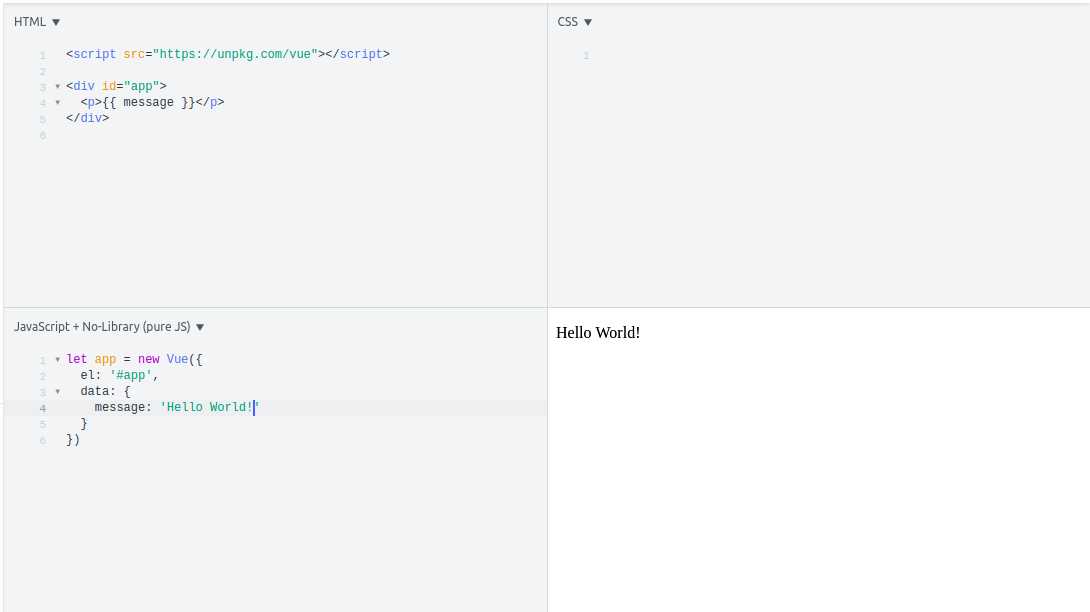
We got the desired output, but like me, you must be wondering what just happened?
As you can see, we pass an object to the new Vue() instance. Thanks to the CDN we attached at the beginning of the HTML file, we get access to the Vue() constructor. Vue.js binds itself to the element with the id that we provide in the el property. And now everything, from what to display in the element to managing how it behaves during events can be controlled from the Vue instance.
Now you must have noticed this data property. All the properties inside it are used to store the values needed in our app. These properties are now added to Vue’s reactivity system. Whenever the values of these properties change, the view will rerender and the new value will be shown. Go to the console of your browser and set app.message to a new value and you can see the output change.
Vue.js uses template syntax - the curly brackets - to bind the DOM to the Vue instance’s data. In {{message}}, the tag gets replaced with the value of message property. Now whenever the value of this property changes the tag will get updated.
On a side note, the properties defined in data are only reactive if they existed when the instance was created. So if you go ahead and create a new property called app.newMessage = ‘World says hello back!’, any changes to newMessage will not cause a rerender.
So there you have it. Your very first Vue app where you say hello to the world! As a “homework/exercise” you could display your name and a title you want to give yourself in separate tags. Give yourself a cool title. Too bad ‘Star-Lord’ is taken.
If you have any corrections, suggestions or feedback for me, feel free to reach out to me at twitter.
See you next time when we jump into directives.

A blog by Gautham Lal where he documents his journey of learning Vue from the prespective of a Vue Newbie.